Add Edit Link
Click on the Add Edit link to create a new edit on an accession. As stated above, it is typically used to add an edit such as “Supervisor Review” to an accession if and when you don't know how to work a particular accession.
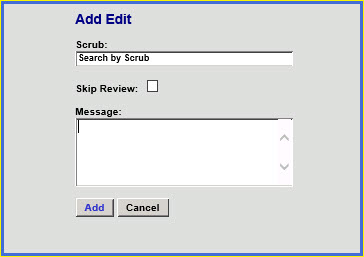
Fill out the Add Edit screen dialog box to create the new edit.
|
The Scrub field expects text which searches existing add edit entries, you can search by scrub ID or scrub name.
The add edits are set up by you in the add edit table, the search allows you to search for those edits that have been set up in that table. The established add edits are the only add edits a user can see and are able to use.
Check the Skip Review checkbox if you want to add this edit to the accession but do not want the message to prevent the accession from billing.
Enter your message into the Message field.
Click the Add button to save this message. Click the Cancel button to discard any data entered here.

| This document contains confidential and proprietary information owned by the Rhodes Group, Inc. This Information may not be downloaded, copied, or transferred, in any medium, either in whole or in part, except as allowed by the Rhodes Group. Copyright 2017, Rhodes Group Inc. | |
| Version 6.0, Release 1
Reference Manual |
Prepared by Rhodes Group
September 2017 |