Accession Update Field Set
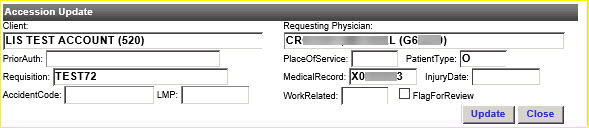
The Accession Update set of fields is located below the gray Accession Update bar as shown below.
|
The accession update set of fields includes: Client, Requesting Physician, PriorAuth, PlaceOfService, PatientType, Requisition, Medical Record, Injury Date, Accident Code, LMP, WorkRelated and FlagForReview.
Change accession information as needed in this area.
If you changed data in the Accession Update area, click on the Update and Close buttons in that area as needed to manage that information.
Click on Update to save the changes you made.
Click on Close to contract, or reduce, the Accession Update section. Any changes you made are not saved if you did not first click on the Update button.

| This document contains confidential and proprietary information owned by the Rhodes Group, Inc. This Information may not be downloaded, copied, or transferred, in any medium, either in whole or in part, except as allowed by the Rhodes Group. Copyright 2017, Rhodes Group Inc. | |
| Version 6.0, Release 1
Reference Manual |
Prepared by Rhodes Group
September 2017 |