Page Navigation Links
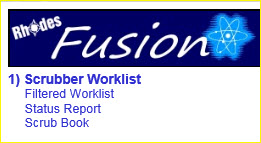
The Fusion Test application supports these links on the left-hand side of the scrubber worklist and filtered worklist pages.
|
These navigation links provide access to software functions as described in their sections later in this manual.
Click on the link to use that feature of the software.
See the manual section for each of these links:
- Scrubber Worklist: Provides access to the complete worklist without filters.
- Filtered Worklist: Displays the scrubber worklist with the filter parameters panel open by default.
- Status Report: Provides a list of accessions being held for a scrub failure.
- Scrub Book: Displays the description of each scrub ID and how the scrub rule is applied.

| This document contains confidential and proprietary information owned by the Rhodes Group, Inc. This Information may not be downloaded, copied, or transferred, in any medium, either in whole or in part, except as allowed by the Rhodes Group. Copyright 2017, Rhodes Group Inc. | |
| Version 6.0, Release 1
Reference Manual |
Prepared by Rhodes Group
September 2017 |