Fusion Page Header Standard Functions
At the top of the Fusion page is a dark blue area which is the page header. In that header area are two functions which are on the page header on both the worklist and the worklist detail pages.
Search by Accession Number
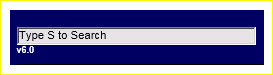
Search on the header bar provides a way to search by accession number.
|
Type an S or click in the field, type an accession number and press Enter to start the search.
Workflow Report Link and Information
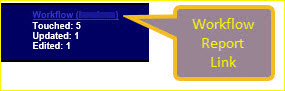
Display a workflow report by clicking on the Workflow (username) link shown below.
|
The workflow report provides additional statistics on the work performed by username on the current day. Username is the logged in user's name, generally your username.
The Touched, Update, and Edited summary are:
- Touched is a count of the different records that have been viewed by username.
- Updated is a count of the different records that have been updated by username.
- Edited is a count of the different records that have been edited or changed by username.
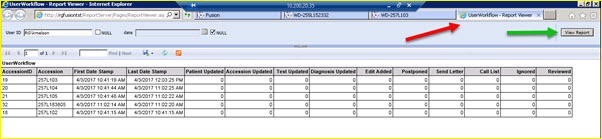
When the workflow link is clicked, a new browser tab, named "UserWorkflow – Report Viewer", is opened to display the report. See the report below and the red arrow showing the browser tab name.
|
Once you have created a report, you may change the report by searching on a different User ID and/or date. Remember to uncheck the NULL box next to the search parameter you want to enter.
You may change the report data by entering one or both search parameters; User ID and date. Start the search by clicking on the View Report button.
When you click on the View Report button, see its location, the green arrow, on the screen above, the report data is refreshed in the same browser tab.
The report defaults to the current username, or user ID, and it can be run for any date. It is not limited to any specific scrub. If items were worked in four different scrubs, they all appear on the report.

| This document contains confidential and proprietary information owned by the Rhodes Group, Inc. This Information may not be downloaded, copied, or transferred, in any medium, either in whole or in part, except as allowed by the Rhodes Group. Copyright 2017, Rhodes Group Inc. | |
| Version 6.0, Release 1
Reference Manual |
Prepared by Rhodes Group
September 2017 |